

Secure-by-Default Starter

1. Why This Playbook Exists
Startups don’t need more checklists, they need habits that live in Git.
This playbook is the practical companion to our “Proof, Not Promises” launch blog. Instead of talking about security, this repo bakes it into your commits and pipelines so it’s impossible to ignore.
You don’t need to be a security engineer to adopt this baseline — it works out of the box.
2. Who This Is For
- Solo Founder/Dev → Investor-ready security in 15 minutes.
- vCISO/Consultant → A trusted baseline you can roll out across multiple clients.
- Investor/Advisor → See what “secure-by-default” actually looks like in practice.
3. The Core Idea: Proof in Git
What makes this different: every safeguard produces evidence you can show to investors, customers, or yourself at 2 a.m. Use Mermaid for visiual diagramming
flowchart LR
Commit --> PreCommit[Pre-commit Hooks]
PreCommit --> CI[CI/CD Scans]
CI --> SBOM[SBOM + Compliance Breadcrumbs]
SBOM --> TrustPage[Trust Page in Repo] This repo is the first brick in the Mergeable Trust framework — where security starts in the commit, not in the audit.
4. What’s Inside v1.0.0
🔒 Pre-commit Guardrails
- Tools: Gitleaks, hygiene + linting hooks.
- Stops: secrets, sloppy configs, bad hygiene.
- Scans staged diffs to block secrets before they ever leave your laptop.
Example pre-commit config (.pre-commit-config.yaml):
repos:
  - repo: https://github.com/gitleaks/gitleaks
    rev: v8.28.0
    hooks:
      - id: gitleaks
        args: ["--staged"]
        exclude: "(^dist/|^build/|^reports/)"

  - repo: https://github.com/pre-commit/pre-commit-hooks
    rev: v4.5.0
    hooks:
      - id: trailing-whitespace
      - id: end-of-file-fixer
      - id: check-yaml
      - id: check-added-large-files
🛡️ CI/CD Scans
- Tools: Trivy for vuln + IaC misconfig detection.
- Policy: HIGH/CRIT = fail — risky builds don’t ship.
- Supports scanning file system, images, and configs.
- Cache the DB between runs for speed.
Example GitHub Action (.github/workflows/security.yml):
name: Security Scans

on: [push, pull_request]

jobs:
  scan:
    runs-on: ubuntu-latest
    steps:
      - name: Checkout code
        uses: actions/checkout@v4

      - name: Run Trivy vulnerability scanner
        uses: aquasecurity/trivy-action@0.12.0
        with:
          scan-type: fs
          ignore-unfixed: true
          vuln-type: os,library
          severity: HIGH,CRITICAL

      - name: Cache Trivy DB
        uses: actions/cache@v3
        with:
          path: ~/.cache/trivy
          key: ${{ runner.os }}-trivy-${{ github.sha }}
          restore-keys: |
            ${{ runner.os }}-trivy-
📦 SBOM Generation
- Generates a Software Bill of Materials every build.
- Artifacts stored in CI → proof of what shipped, when.
- Can be uploaded to Dependency-Track, CycloneDX viewers, or other tools.
- Example:
sbom.jsonunder GitHub Actions artifacts.
Example GitHub Action step:
      - name: Generate SBOM
        uses: anchore/sbom-action@v0.16.0
        with:
          format: spdx-json
          output-file: sbom.json

      - name: Upload SBOM as artifact
        uses: actions/upload-artifact@v3
        with:
          name: sbom
          path: sbom.json
📚 Learn-by-Contrast Examples
-
Dockerfile: insecure vs secure side-by-side.
# ❌ Insecure FROM ubuntu:latest # ✅ Secure FROM ubuntu@sha256:<pinned-digest> USER 10001 -
Terraform: insecure vs secure side-by-side.
# ❌ Insecure
ingress {
  from_port   = 22
  to_port     = 22
  protocol    = "tcp"
  cidr_blocks = ["0.0.0.0/0"]
}

# ✅ Secure
ingress {
  from_port   = 22
  to_port     = 22
  protocol    = "tcp"
  cidr_blocks = ["203.0.113.0/24"]
}
🏗️ Architecture Diagram
Use Mermaid for visiual diagramming
graph TD
  Dev[Developer Commit] --> PreCommit[Pre-commit Hooks]
  PreCommit --> CI[GitHub Actions]
  CI --> Scans[Trivy Scan + SBOM]
  Scans --> TrustPage[docs/trust-page.md]
  Dev --> BranchProtection[Branch Protections]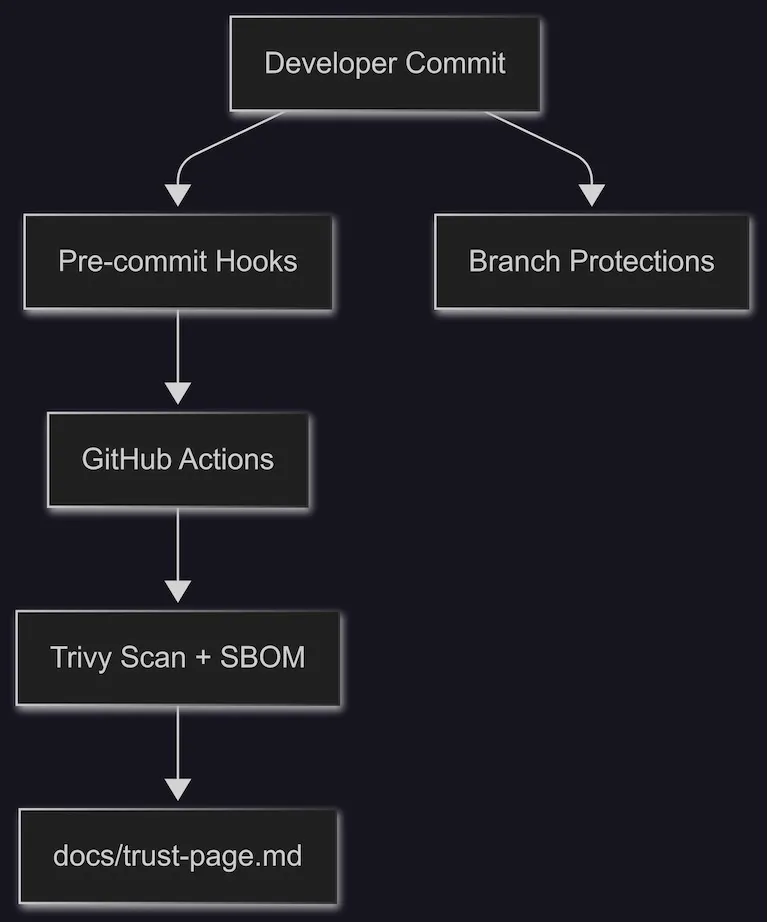
5. Step-by-Step Adoption Guide
-
Fork the repo
- Click “Use this template” on GitHub.
-
Install Pre-Commit Hooks
brew install pre-commit pre-commit install pre-commit install --hook-type commit-msg -
Enable GitHub Actions
- Repo → Settings → Actions → General → Enable workflows.
-
Protect
mainbranch- Repo → Settings → Branches → Add branch protection rule.
- Require status checks to pass.
- Enable “Dismiss stale reviews” + “Require linear history.”
-
Run a Red PR Drill
- Add a known vuln (e.g.,
FROM ubuntu:latest). - Open PR → watch CI fail → fix → watch green.
- Add a known vuln (e.g.,
-
Link Your Trust Page
- Add this to your
README.md:## Trust Evidence See [docs/trust-page.md](./docs/trust-page.md) for security checks and results.
- Add this to your
-
Customize Later
- Keep defaults (
HIGH/CRIT = fail). - Adjust thresholds once your team is comfortable.
- Keep defaults (
6. Quick Wins Checklist
- Pre-commit hooks installed across dev laptops
-
mainbranch protected - SBOM artifacts saved in CI
- Trust page linked in README
- Red PR drill run + fixed
- Trivy DB caching enabled
- First SBOM reviewed manually
7. Business Outcomes
- Investor diligence → one link, not one week.
- Customer trust → deal velocity increases.
- Leak/vuln prevention → fewer fire-drills.
- Security = velocity → not slowdown.
8. Roadmap (Next Versions)
- 🔑 Supply-chain attestation (Sigstore with cosign + GitHub OIDC).
- 🤖 AI-native checks for prompt & secret leaks.
- 📊 Expanded compliance mapping (NIST SSDF, OSPS, SLSA).
- 📜 Policy-as-code (OPA/Conftest).
9. Community Call-to-Action
- Fork it, adapt it, and tell us what breaks.
- Contribute secure vs insecure examples.
- Add compliance mappings for your industry.
- Join the conversation in GitHub Discussions & Issues.
10. Resources
Tools
CNCISO
👉 Secure-by-default isn’t a slogan. It’s a repo you can fork today.